

A strong backlink profile can significantly boost your website’s authority and organic visibility. However, it is also true that a few risky links can work against your SEO efforts.
Backlinks coming from spammy, irrelevant, or low-quality sources may send negative signals to search crawlers and increase the risk of ranking penalties. That’s why, when performing an SEO audit, it is essential to identify the risky backlinks.
However, identifying risky backlinks involves more than simply checking which websites link to your site. In this blog post, we’ve talked about this in detail.
So, read on till the end.
Procedure for Identifying Risky Backlinks During an SEO Audit
Below, we have discussed a step-by-step procedure for identifying risky backlinks during an SEO audit.
1. Gather Backlink Data
First of all, your job is to collect all the backlink data for your website. This data will show you which websites, publications, journals, or other online sources are linking to your site or its specific webpages.
Now the question is: how can you gather backlink data? Well, the process is simple and straightforward. There is a wide variety of advanced SEO tools such as Ahrefs that allow webmasters to view and export the backlink profile of an entire site in just a few clicks.
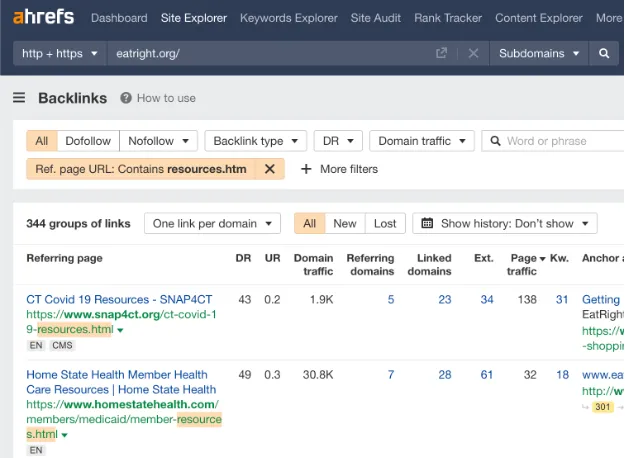
The tool offers different filters to sort and organize the backlinks based on different metrics such as:
- Domain rating score
- Traffic of the linking website
- Link type (nofollow and dofollow)
Having a complete list of your website’s backlinks will make it easier for you to identify and investigate harmful sources during an SEO audit.
2. Evaluate the Quality of Referring Domains
Now it is time to start evaluating the websites linking to your domains. This involves considering a number of factors, but before heading towards them, you should understand this:
A backlink from a relevant, trustworthy, and credible website is generally considered more helpful than one that comes from a low-quality or irrelevant site.
Here is how you can evaluate the quality of referring domains:
- Check whether the referring domain shares the same industry and target audience as your website. If yes, then it’s a good sign.
- Also, assess the organic visibility, site structure, and overall technical performance of the linking website to gauge its authority and credibility.
- Most importantly, review the overall content quality to determine whether the linking site offers valuable information to its visitors or seems to exist primarily to publish links. Risky links usually come from thin, generic, and low-quality content.
While reviewing the linking website, look for warning signs such as coverage of irrelevant topics, excessive advertisements, and pages filled with questionable links.
Precaution: Avoid judging the quality of the referring domain based on a single metric. Also, keep in mind that a backlink from a low-authority site isn’t always risky, as this depends on other factors discussed in this blog.
3. Check the Spam Score of the Linking Website
Spam score is one of the most widely used and acknowledged metrics for quickly identifying risky backlinks. It is a third-party score (1–100) that estimates how closely a website resembles domains associated with spam and manipulative SEO practices.
During an SEO audit, check the spam score of the website linking to your domain. This can be easily done using a spam score checker. Simply enter the site URL or domain address, click the button, and check the score.
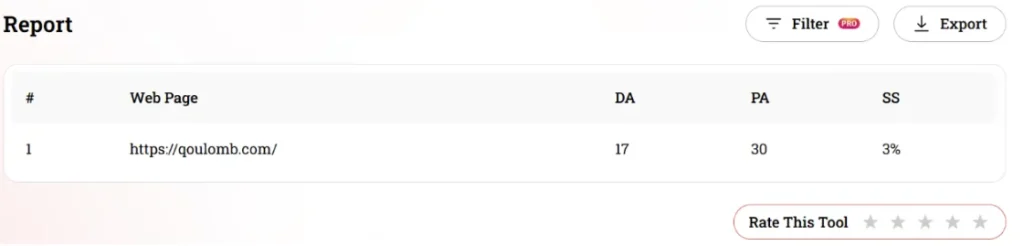
A high spam score means that the website deserves your close attention and further investigation. It is essential to note that the spam score is not officially recognized by Google as an SEO factor.
For this reason, it should not be treated as a sole indicator of a risky link. Instead, use it alongside other metrics such as topical relevance, content quality, and overall context to assess backlink risk.
4. Analyze Anchor Text Distribution
The anchor text used in the backlinks can also provide a good idea about their authenticity and naturalness.
Risky links are often placed on irrelevant anchor text or within unrelated content, providing little value to the audience. Besides this, they also use repetitive anchor text, creating a suspicious link-building pattern. On the other hand, a high-quality backlink usually has clear, focused, and natural anchor text.
While conducting an SEO audit, carefully review the anchor text distribution of your entire backlink profile. This will help you determine whether the anchor text appears appropriate or spammy.
If numerous referring domains use the same keyword-rich anchor text to link to your website or its pages, this may indicate a suspicious pattern. You should thoroughly compare these patterns with the context in which the links were acquired to determine whether the anchor text appears natural or forcefully added.
5. Look for Suspicious Backlink Patterns
Lastly, examine your website’s backlink profile as a whole instead of evaluating each link individually. Doing so will also help you identify suspicious patterns across multiple referring domains.
For this, you need to pay attention to:
- Sudden or unexpected increase in backlinks
- Repeated links coming from the same domain or source
- Sitewide links
Besides this, you should also look for referring domains that share similar content, layout, and linking patterns. If several warning signs are appearing together, those backlinks may be risky and deserve closer investigation.
Actions to Take After Identifying Risky Backlinks
Here are a few actions that can be taken after identifying risky backlinks.
1. Contact the Website Editor for Removal
After finding a risky or spammy backlink, you should contact the editor or owner of the referring domain and request its removal. You can easily find contact information by reviewing the linked website’s Contact Us page or checking its social media pages.
Next, send a clear, concise message requesting the removal of the specific backlink. Include the URL of the referring page and, if helpful, a screenshot showing where the link appears. It is suggested to mention the URL and a screenshot of the exact spot for easier understanding.
In case you have contacted multiple editors for link removal, keep a record of your outreach and the responses you receive. Although webmasters may not always respond, a record will help you manage the link removal process systematically.
2. Use the Google Disavow Tool
Another option is Google’s Disavow Links tool, which allows website owners to ask Google to disregard specific backlinks.
Here is how you can use it:
- First, create a .txt file and paste the risky backlinks
- Add one URL per line for individual pages you want to disavow. To disavow an entire domain, use the format domain:example.com.
- Encode the file in UTF-8 or 7-bit ASCII
- Once the .txt file is created, log in to your Google Search Console and navigate to Google’s Disavow Tool page.
- Select your website property and click on “Disavow Links”
- Upload the .txt file
- Click upload/submit to process the list of risky links
Note that the Google Disavow Tool should be used with caution.
Build a stronger organic growth engine
Turn search visibility into qualified B2B traffic and pipeline with a strategy built around your business goals.
Book a CallQoulomb helped us show up in AI search answers, not just Google. They spotted early that our landing pages were the problem and fixed them with us.

Jose Russo Pons
Head of Growth Marketing, GAIN
Wrapping It Up
A few risky backlinks are enough to derail your entire SEO strategy and website performance. That’s why whenever you conduct an SEO audit, do not forget to identify bad links. This process involves taking care of multiple factors such as evaluating the quality of referring domains, spam score, anchor text distribution, and more. In this detailed blog post, we have explained the entire process in detail, along with some actions you can take to eliminate bad backlinks.